OJS如何批量导入文章数据?

很多同学,他们在使用OJS之前,自己的网站已经发布了很多期刊文章,在使用OJS之后,有什么办法,可以把这些文章的数据一次性的批量导入到OJS中呢?今天丁老师给你解答。
OJS导入文章的方法:
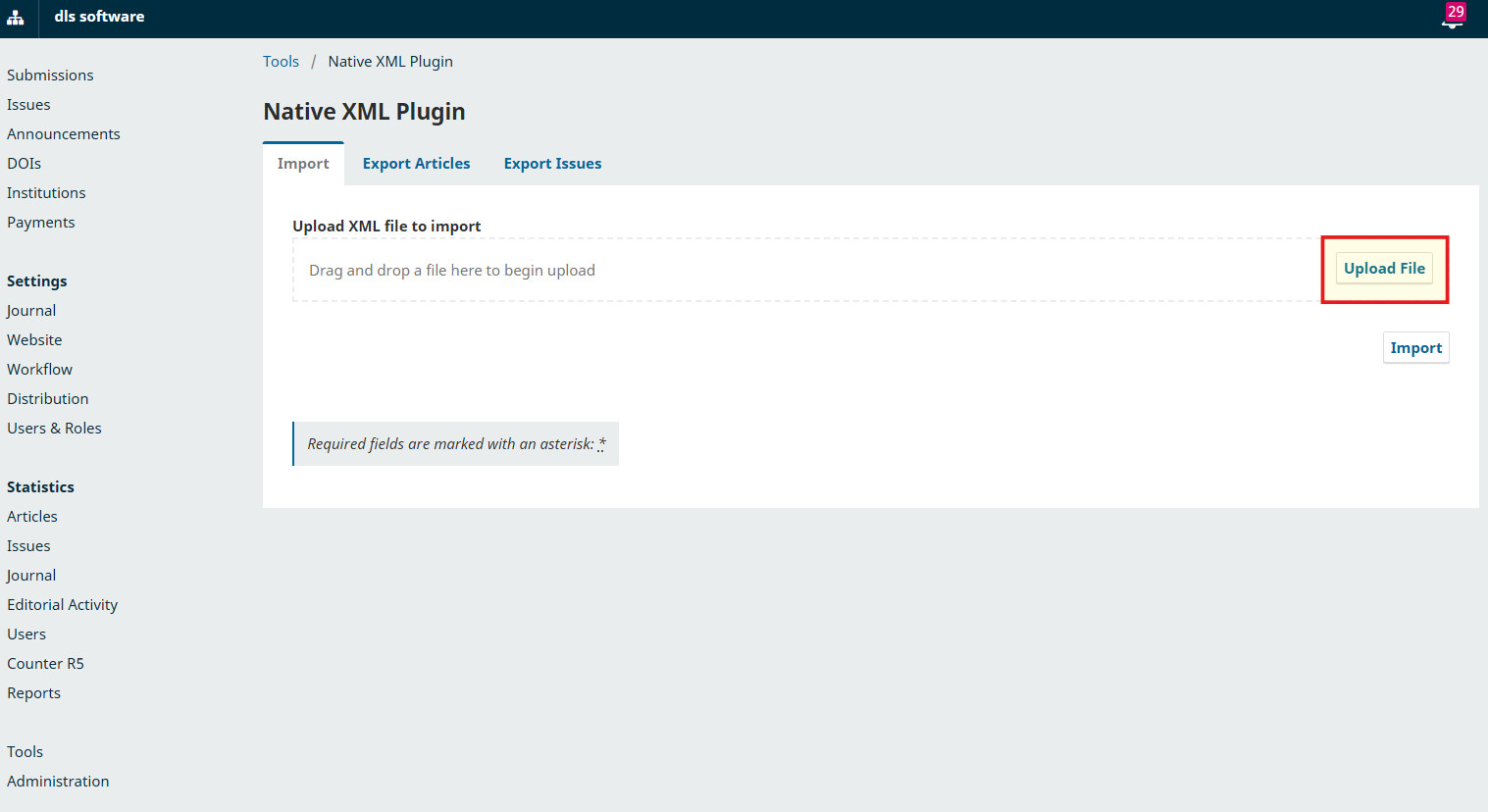
1.用管理员账号进入Dashboard,左侧菜单选择Tools。进入页面后,右侧点击选择Native XML Plugin。
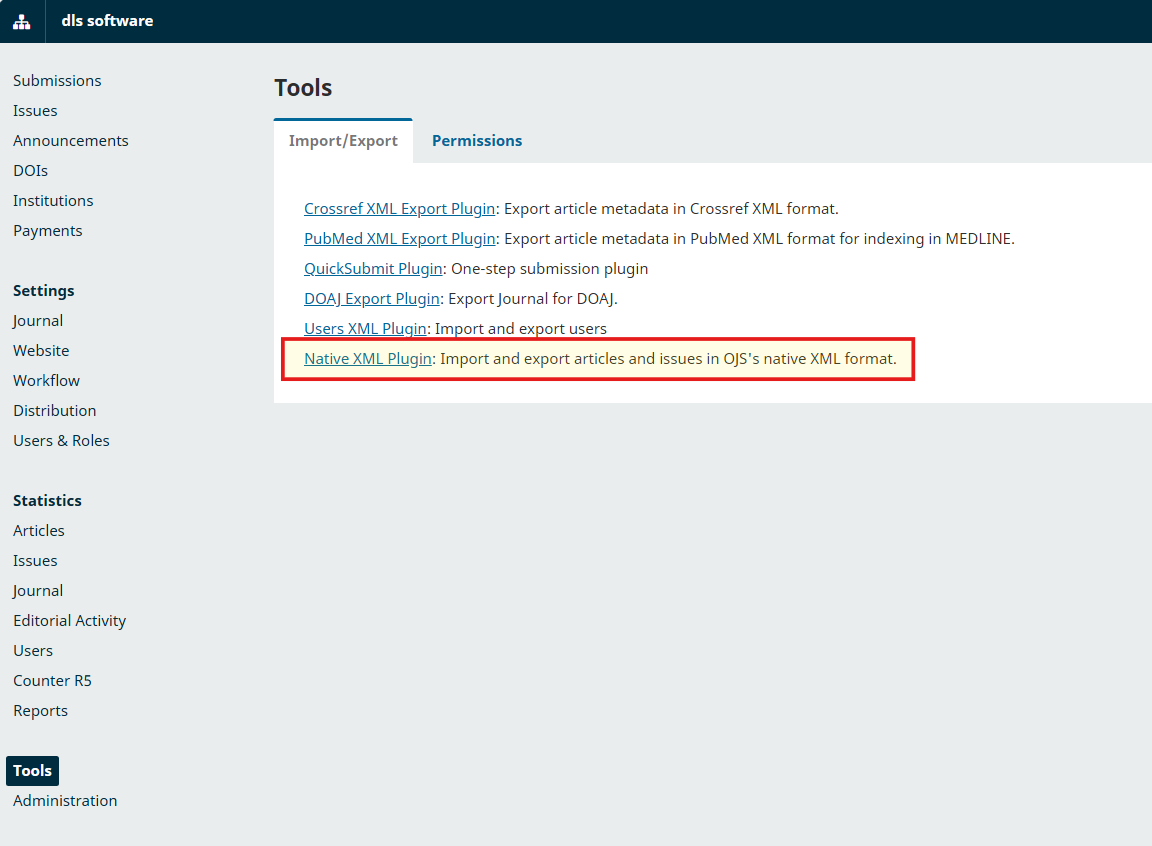
2.进入Native XML导入页面,在Import选项卡中,点击Upload File,上传要导入的文章xml文件,即可导入。
3.XMl格式范例:
<?xml version="1.0" encoding="utf-8"?>
<articles xmlns="http://pkp.sfu.ca" xmlns:xsi="http://www.w3.org/2001/XMLSchema-instance" xsi:schemaLocation="http://pkp.sfu.ca native.xsd">

  <article xmlns:xsi="http://www.w3.org/2001/XMLSchema-instance" locale="en">
    <submission_file xmlns:xsi="http://www.w3.org/2001/XMLSchema-instance" xsi:schemaLocation="http://pkp.sfu.ca native.xsd">
      <name locale="zh_CN">文件名称.pdf</name>
      <file id="27" filesize="116414" extension="pdf">
        <embed encoding="base64">文件base64值</embed>
      </file>
    </submission_file>
    <publication xmlns:xsi="http://www.w3.org/2001/XMLSchema-instance" version="1" status="1" url_path="" seq="0" access_status="0" section_ref="ART" xsi:schemaLocation="http://pkp.sfu.ca native.xsd">
      <id type="internal" advice="ignore">21</id>
      <id type="doi" advice="update">10.0000/cy3j9n23</id>
      <title locale="en">文章标题1</title>
      <abstract locale="en">文章摘要</abstract>
      <authors xmlns:xsi="http://www.w3.org/2001/XMLSchema-instance" xsi:schemaLocation="http://pkp.sfu.ca native.xsd">
        <author include_in_browse="true" user_group_ref="" seq="0" id="19">
          <givenname locale="en">作者姓名</givenname>
          <country>作者国家代码</country>
          <email>作者Email</email>
        </author>
      </authors>
    </publication>
  </article>

  <article xmlns:xsi="http://www.w3.org/2001/XMLSchema-instance" locale="en">
    <submission_file xmlns:xsi="http://www.w3.org/2001/XMLSchema-instance" xsi:schemaLocation="http://pkp.sfu.ca native.xsd">
      <name locale="zh_CN">文件名称.pdf</name>
      <file id="27" filesize="116414" extension="pdf">
        <embed encoding="base64">文件base64值</embed>
      </file>
    </submission_file>
    <publication xmlns:xsi="http://www.w3.org/2001/XMLSchema-instance" version="1" status="1" url_path="" seq="0" access_status="0" section_ref="ART" xsi:schemaLocation="http://pkp.sfu.ca native.xsd">
      <id type="internal" advice="ignore">21</id>
      <id type="doi" advice="update">10.0000/cy3j9n23</id>
      <title locale="en">文章标题2</title>
      <abstract locale="en">文章摘要</abstract>
      <authors xmlns:xsi="http://www.w3.org/2001/XMLSchema-instance" xsi:schemaLocation="http://pkp.sfu.ca native.xsd">
        <author include_in_browse="true" user_group_ref="" seq="0" id="19">
          <givenname locale="en">作者姓名</givenname>
          <country>作者国家代码</country>
          <email>作者Email</email>
        </author>
      </authors>
    </publication>
  </article>

</articles>
导入须知:
1.请按照XMl格式来填写内容。
2.文章的PDF或Word附件,须以base64的内容格式,填入到<embed encoding="base64">中。
备注:
这是OJS系统自带的导入功能,需要严格按照XML的格式来完善内容,确保内容无误后可以导入,但是该操作需要具备一定的专业能力,如果格式不对或者内容错误,就会出现无法导入的情况。
如果你也有大量数据需要导入,却自己无法解决,可以使用丁老师的OJS数据导入服务协助完成。

ojs相关文章

有使用OJS系统(Open Journal Systems)做期刊运营的同学发现,在OJS3.5版本中,在设置期刊的编审团队信息时,并不能像之前的板块一样可以随意填写了,而是需要通过设置用户角色的方式,来自动显示编委信息。这种调整是怎么...
最近有客户在使用OJS系统时,在Issue中上传了整刊PDF,但是却打不开,显示空白,如图:错误代码提示:viewer.mjs:1Failed to load module script: Expected a JavaScript-o...
2026年9月1日,Open Journal Systems(OJS)期刊管理系统官方开发团队,PKP公共知识项目工作室,发布公告称适用于OJS3.5版本的OA Switchboard插件发布。该插件启用后,当一篇文章正式发布后,插件可...
最近有一家秘鲁的出版社客户,在OJS软件的使用中,遇到了故障,插件页(plugin)一直在加载,页面一直在转圈,始终打不开,咨询了丁老师。故障图:初步分析:丁老师经过分析后,初步认为这是由第三方插件引起的故障,导致页面程序无法正常执行,...